
New Computer, New Installation, Neither BG1EE or BG2EE are running. Please help.
 Gnoll
Member Posts: 33
Gnoll
Member Posts: 33
I have recently bought a new computer for the first time in almost 9 years. One of the first things that I did was install BGEE and BG2EE with Steam. Yesterday, I launched BGEE no problem at all. I installed a few mods, launched again, no problems at all. Today I installed a few more mods, then when I went to launch it, it gave me the following error message.
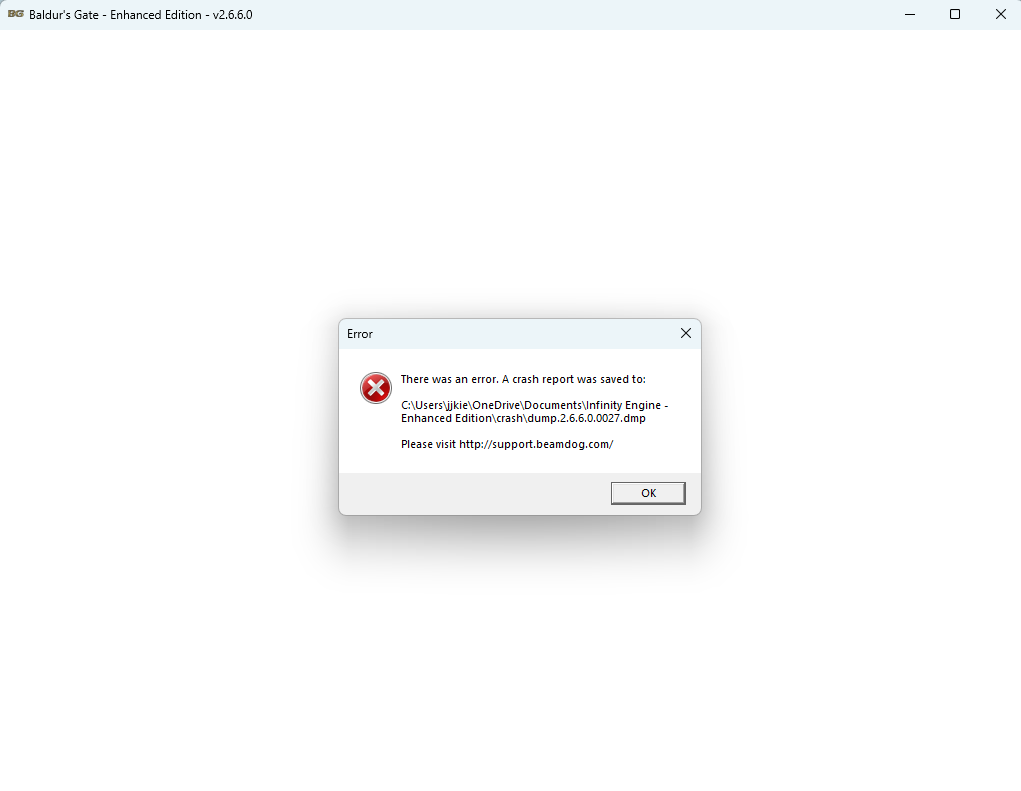
I figured it must have been an issue with some mods, so I uninstalled the most recent ones and then tried again. Same error. I decided to uninstall and then delete all of the folders and do a clean install. When I tried to run a clean install, I got the same error.
Panicking a bit, I ran BG2EE for the first time, not having touched it or opened it at all. Same error message.
Uninstalled both, clean installed both. Still have the error message. I have no idea what to do.
I have DMP files, but can't upload it directly to this post, so I am linking a google drive link here, I hope that is okay: https://drive.google.com/drive/folders/1b0TvJcm1jyexbYgJ-zroAU8MOwlttvWl
I figured it must have been an issue with some mods, so I uninstalled the most recent ones and then tried again. Same error. I decided to uninstall and then delete all of the folders and do a clean install. When I tried to run a clean install, I got the same error.
Panicking a bit, I ran BG2EE for the first time, not having touched it or opened it at all. Same error message.
Uninstalled both, clean installed both. Still have the error message. I have no idea what to do.
I have DMP files, but can't upload it directly to this post, so I am linking a google drive link here, I hope that is okay: https://drive.google.com/drive/folders/1b0TvJcm1jyexbYgJ-zroAU8MOwlttvWl
0
Comments
1/ Right-click your Desktop and select Display Settings
2/ Scroll down to Graphics
3/ Find Baldur's Gate Enhanced Edition in the list (if it's not there, click "Browse" and find the .exe in your Steam folder)
4/ Click Options and set it to High Performance
5/ Do the same for BG2EE