
Infinity Mod Runner - Desktop Installer for EET and soon other Infinity Engine Mods
 Anprionsa
Member Posts: 126
Anprionsa
Member Posts: 126
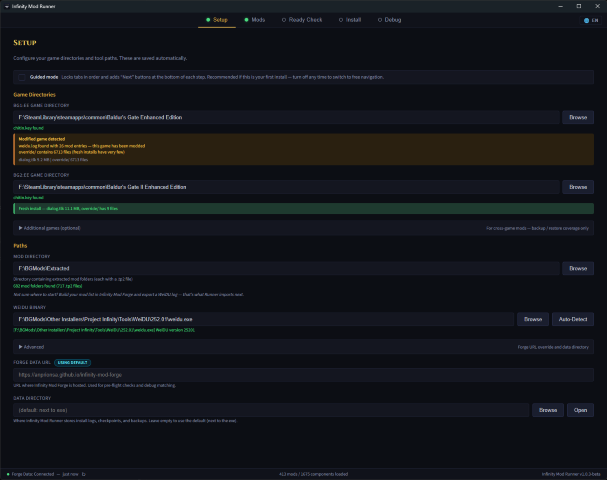
A cross-platform desktop app (Windows, macOS, Linux) that installs your mods for you. Native Rust WeiDU driver with real-time progress, per-batch error recovery, multi-game backups, and auto-update.
Built as the companion to Infinity Mod Forge: build your WeiDU.log there, run the install here.
Download the latest release | Source on GitHub
About the rename: The tool suite (Forge, Runner, Telemetry) was renamed from "EET" to "Infinity" to reflect support for the broader Infinity Engine family: BG1EE, BG2EE, SoD, IWDEE, IWD2, PSTEE. The EET mod itself (EET.tp2 by K4thos) is unrelated to this rename. The Runner is EET-aware (two-phase install, dual log slots) but works fine for standalone BG2EE or IWDEE installs too.
What it does:
- Drives WeiDU directly, with no subprocess wrapper or intermediate log format. Real-time progress dashboard with triple-source reconciliation (install log, stdout counter, WeiDU.log)
- Per-batch error recovery. When a batch fails: Retry, Skip, or Stop. Auto-retry-once-then-skip mode for hands-off runs. Checkpoints on interrupt so you can see where you left off
- Pause and resume between batches with a user-facing banner, and the elapsed-time counter actually freezes while you're paused
- 60+ pre-install patches for known mod bugs, applied to the Extracted source before WeiDU runs. Idempotent, one-click, covering the usual SFO library issues, BCS decompile guards, IDS pre-population, and kit-specific fixes
- Silent-skip and Sys_error detection: components that should have installed but didn't get caught, even when WeiDU exited 0. Wrong tp2 paths, unreadable files, and the "installed successfully but isn't in weidu.log" class of bug all get flagged
- Warning classifier. Every "Installed with warnings" gets broken down into severity chips (cosmetic, likely-benign, caution, concerning, or unknown). The scary count becomes a triage list with workarounds
- File Guard. Post-batch md5 snapshots catch silent cross-mod file corruption. Auto-restores from snapshot on suspicious drift, or pauses for a decision. Writes a report for diagnosis
- Multi-game backup. Snapshot, restore, and verify your game directory. BG1:EE, BG2:EE, IWD:EE, IWD2, PST:EE each get their own backup tab with per-game override directories
- Debug analyzer. Drop a 500 MB WSETUP.DEBUG and get collapsible sections for errors, warnings, known issues, and installed components, grouped with occurrence counts
- Diagnostic bundle. One-click zip of your logs and a redacted config for bug reports. Includes a README explaining what's inside
- Install comparison. Diff a Forge export against your installed WeiDU.log to see what's missing or partial
- Multi-language UI: English, German, French, Polish
- Auto-update. Signed releases via Tauri updater (minisign); the updater verifies every update payload independently of OS signing status
- First-run welcome. Optional Guided mode locks tabs into Setup → Mods → Ready Check → Install with explicit "Next" buttons for first-timers; power users leave it off
Resilient WeiDU (experimental, opt-in): The Runner ships a vendored, lightly modified WeiDU source tree based on WeiDU 251. All modifications are tracked in git (not as out-of-tree patches), public for scrutiny. Two current modifications: resilient DECOMPILE_AND_PATCH (BCS round-trip exceptions become warnings instead of aborting the install, targeting Ajantis, Golem Construction, and SoD companion scripts) and a BCS buffer cache (LRU memoization at Load.load_resource that makes repeated COPY_EXISTING_REGEXP scans faster). Binaries are opt-in per install; your configured WeiDU is untouched unless you toggle the experimental bundle on.
State of it: This is a beta release. The last shipped build (v1.0.2-beta) was proven end-to-end by a 12.2-hour, 1675-component megainstall (1600 ok, 0 errors, 0 cascade-skips), but the sample size of "megainstalls against this codebase" is still small. Back up your game directory before running. The backup system is built in and takes a minute to kick off.
Windows and macOS users, first-launch warning: Releases are currently unsigned on Windows and unnotarized on macOS (code signing is in progress, SignPath.io OSS application is out). You'll see a one-time warning on first launch:
- Windows: SmartScreen shows "Windows protected your PC". Click More info → Run anyway. Remembered per machine.
- macOS: Gatekeeper shows "cannot be opened because Apple cannot check it for malicious software". Right-click the app in Finder → Open → confirm. Remembered per machine. The DMG background displays the same hint at mount time.
Credits:
- mod_installer by dark0dave: the direct basis for how the Runner drives WeiDU. Log-based install replay, batching, and the CLI-flag surface all come from there. If you want a lean command-line version of this workflow, use it directly.
- BWS-NG: provided the UI blueprint I borrowed most heavily from. Layout, pacing, and the way install state is surfaced.
- Project Infinity by AL|EN: the installer the community has leaned on for the better part of a decade, and the reason this project exists at all. The Runner is an attempt to carry that tradition forward in a new stack.
- EET by K4thos and the Gibberlings3 community: the mod that makes the whole continuous BG1+SoD+BG2+ToB experience possible.
- WeiDU: none of this works without it.
- Mod authors: everyone across Gibberlings3, Beamdog Forums, Spellhold Studios, Weaselmods, Artisan's Corner, and Pocket Plane Group who builds and maintains the mods this Runner exists to install.
Related projects:
- Infinity Mod Forge (formerly EET Mod Forge): web-based mod browser and install-order builder
- infinity-mod-telemetry (formerly eet-mod-telemetry): crowdsourced compatibility data from anonymized install reports
Feedback, bug reports, and corrections welcome. If something breaks, the Debug tab has a one-click diagnostic bundle generator. Attach the zip to a GitHub issue or reply here.
0