
[TOOL] Uncertain Sky (weather and .wbm files unlocker)
 bzm
Member Posts: 57
A small Win32 helper for Planescape: Torment: Enhanced Edition (x64) for game ver 3.2.2,
that unlocks hidden weather, makes rain, snow, fog, lightning actually work in the game.
Additionally, It enables with flag 13 in animation (.are file) WBM files (flag 13 must be set, and "is shown" in animation section).
It never modifies Torment.exe on disk - everything happens in the game's memory!
You can use the program in two ways: force the weather using the control panel, or specify the probability of each weather condition in the .are file.
Debug console: C:SetWeather(1) - rain, 2 - snow, 3 - fog, 0 - off.
This tool was created for the “Blizzard in Baator” mod. I don't know if anyone will actually use it lol, but that was my goal: to unlock the weather in PSTEE.
There might be some bugs; I tested it as much as I could...
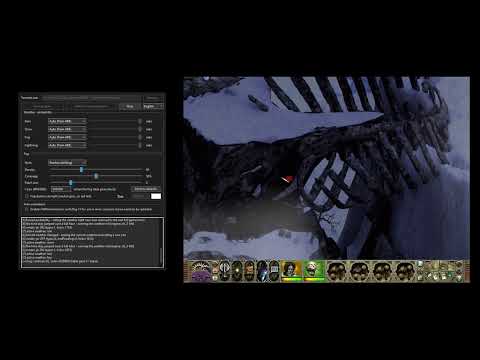 https://www.youtube.com/watch?v=EtMfmlaZgX0
Usage:
0. Copy the exe file and “override” folder to the game folder and run UncertainSky.exe.
1. "Launch game" starts Torment.exe suspended, patches it, then resumes it.
"Attach" does the same to an already running game.
2. With certain settings, you don't need to restart the game for the changes to take effect.
When the probability field in .are is set to 100% so that the weather is set immediately upon entering the location, add the following to the location's script:

https://www.nexusmods.com/planescapetormentenhancededition/mods/19?tab=files
I'm planning to release a Linux version, but that's for the future.
DISCLAIMER:
AI (mainly Claude) helped create this program. Without it, nothing would have been created.
---
szef (501)
that unlocks hidden weather, makes rain, snow, fog, lightning actually work in the game.
Additionally, It enables with flag 13 in animation (.are file) WBM files (flag 13 must be set, and "is shown" in animation section).
It never modifies Torment.exe on disk - everything happens in the game's memory!
You can use the program in two ways: force the weather using the control panel, or specify the probability of each weather condition in the .are file.
Debug console: C:SetWeather(1) - rain, 2 - snow, 3 - fog, 0 - off.
This tool was created for the “Blizzard in Baator” mod. I don't know if anyone will actually use it lol, but that was my goal: to unlock the weather in PSTEE.
There might be some bugs; I tested it as much as I could...
https://www.youtube.com/watch?v=EtMfmlaZgX0Usage:
0. Copy the exe file and “override” folder to the game folder and run UncertainSky.exe.
1. "Launch game" starts Torment.exe suspended, patches it, then resumes it.
"Attach" does the same to an already running game.
2. With certain settings, you don't need to restart the game for the changes to take effect.
When the probability field in .are is set to 100% so that the weather is set immediately upon entering the location, add the following to the location's script:
IF
    OnCreation()
THEN
    RESPONSE #100
        Weather(SNOW)
END
https://www.nexusmods.com/planescapetormentenhancededition/mods/19?tab=files
I'm planning to release a Linux version, but that's for the future.
DISCLAIMER:
AI (mainly Claude) helped create this program. Without it, nothing would have been created.
---
szef (501)
Post edited by bzm on
0