
[Mod Tool] Portrait Scout
 smeagolheart
Member Posts: 7,977
A tool that lists the speaking creatures of an Infinity Engine mod or game - with
line counts, portraits, and the areas they spawn in - and turns your portrait
selections into an installable mod.
Use it to plan NPC portraits: sort by who talks, how much, which portrait each uses
(spot duplicates and gaps), review where each creature appears, and which creature file
to open in NearInfinity. It reads your game folder and never changes it.
It can be pointed at individual mod folders or the base game: BG1EE, SoD, BG2EE,
EET, IWDEE, and classic BG1, BG2 and IWD (PST and IWD2 are not supported because they use different creature files) .
A mod doesn't have to be installed, Portrait Scout can read the mod's own files and discover what has.
Propose a portrait for any creature from a picture you already have, OR generate one with your own local image generator (optional - no generator and no models are bundled but instructions and direct links are included to a working method).
Creatures merged under one name, like a mod's 27 "Kobold Commoner", can be decloned so each takes a portrait of their own.
Finally, **Create mod** writes a ready-to-install WeiDU mod with your pictures, the tp2 and instructions.
https://github.com/smeagolheart/PortraitScout
line counts, portraits, and the areas they spawn in - and turns your portrait
selections into an installable mod.
Use it to plan NPC portraits: sort by who talks, how much, which portrait each uses
(spot duplicates and gaps), review where each creature appears, and which creature file
to open in NearInfinity. It reads your game folder and never changes it.
It can be pointed at individual mod folders or the base game: BG1EE, SoD, BG2EE,
EET, IWDEE, and classic BG1, BG2 and IWD (PST and IWD2 are not supported because they use different creature files) .
A mod doesn't have to be installed, Portrait Scout can read the mod's own files and discover what has.
Propose a portrait for any creature from a picture you already have, OR generate one with your own local image generator (optional - no generator and no models are bundled but instructions and direct links are included to a working method).
Creatures merged under one name, like a mod's 27 "Kobold Commoner", can be decloned so each takes a portrait of their own.
Finally, **Create mod** writes a ready-to-install WeiDU mod with your pictures, the tp2 and instructions.
https://github.com/smeagolheart/PortraitScout
Post edited by smeagolheart on
0
Comments
Latest:
## Portrait Scout 1.3d
### Fixed
* **A picture chosen with Select image... could be deleted by Discard.** It was
added to the candidates where it lay, so discarding the candidate deleted
your original file. It is copied into the generated folder first now, and
Discard only ever removes the copy.
* **Imported pictures had no preview and no crop box.** Candidates were read
with Tk, which handles PNG and GIF and nothing else, so a JPEG showed as a
file name with no canvas — and the yellow box only exists on a canvas. They
are opened with Pillow when it is installed, so JPEG, WebP and TGA preview
and crop like a generated candidate.
* **A stock portrait gave twenty creatures one face.** The face was drawn from
the portrait file first, so everyone wearing a shared picture like CotSC's
`FARM` got the same nose, face and hair. The creature file decides now; the
portrait is only used when a row has no creature file at all. "Any portrait"
no longer keys a face either, so generic pictures vary again.
* **A kept description could turn up on the wrong creature** — a female
description offered for a male creature. Each saved description is now
stamped with the creature it was written for, and one that belongs to
another is ignored in favour of the game data. Descriptions you edited
before this are claimed by the creature that opens them next, so they
survive without being able to drift.
* **Discard all** missed imported pictures, and sat at the end of the longest
row in the tab where it was clipped. It sweeps them now, from the engine row.
### Changed
* `face`, `nose` and `hair` hold fifteen terms each instead of seven or eight,
with plain ones among them — a straight nose, an oval face, short neat hair.
One in seven meant a distinctive term like "a broken flattened nose" read as
though it were on every other picture; the commonest is now about one in
eleven.
* The lines window closes when you press **Propose** instead of lurking behind
the main window.
* The Propose tab has a **◀ Gallery** / **◀ Table** button that returns you to
where you came from. It appears only when a creature is selected.
## Portrait Scout 1.3
- **Declone** splits creatures that were merged only because they share a name
and look alike — a mod's 27 "Kobold Commoner" creatures become 27 entries,
each taking a portrait of its own. Per creature, and remembered.
- A creature's lines window names everyone else using its portrait, and
**Use for others...** hands the proposed picture to any of them.
- **Sort** by lines or by name, either way round, and hide the joinable
party NPCs (the game's and the mods').
### Portraits in
- Any picture can be proposed. It is cut to the portrait's shape, shrunk and
saved as a 24-bit BMP when the mod is made — BMP and PNG on their own, the
rest with Pillow.
- **Frame...** puts a box on the picture to say which part becomes the
portrait, instead of always taking the middle.
- A proposed picture's file name no longer matters: the mod names every
picture after its creature file.
### Generating
- Every creature draws its own face — shape, nose, hair, and sometimes a scar
or a missing tooth — from its own file. The same creature is the same person
on every run, and creatures sharing a portrait share a face, so a decloned
crowd comes out as a crowd of different people.
- **Age** and **Look** pickers (Young…Ancient; Weathered, Blotchy and
freckled, Scarred, Angry…) write into the description.
- Backgrounds vary: `{random}` picks one of twelve muted earth schemes per
picture, so a few thousand portraits don't all sit against the same wash.
- The **BG2 oil painting** style is rewritten — character and clothing first,
painting instructions after, no lighting sentence, skin asked for matte and
mottled. The previous wording is kept as a style of its own.
- Pictures are generated 656 wide, not 652. Flux's VAE works in 16-pixel
blocks and the remainder came out as a strip of noise down the left edge.
- Head zoom starts at 1.0, now that the prompt frames the head itself.
### Generate tab
- Fewer, fuller rows: background with candidates, style and LoRA; Generate
with the crop controls; the engine and prompt buttons below; status and
progress side by side.
- Engine settings collapse into one menu. Portrait size and step count are
dropdowns.
- Candidates are shown at one size for comparing, unless **Full size** is
ticked. Arrows move the crop box on every candidate at once.
- Making a game portrait replaces the one before it instead of piling up, and
a proposed .bmp opens when clicked.
### Also
- The to-do list says what to name each picture and how to set it in
NearInfinity; a generated mod's readme carries a version and a date; the
WeiDU program copied beside a new mod is checked before it is used.
Portrait Scout 1.2
Reading the mod's own files
The mod no longer has to be installed.
New checkbox Read the mod's own files: works from the mod's own .d, .tra, .tp2, .cre, .baf and .are files instead of matching its text against the installed game.
Every line comes with its speaker, so short stock lines ("Yes.") are no longer credited to the wrong creature, and components that are not installed are counted too.
Dialogs are linked to creatures through creature files, tp2 patches, party tables, SetDialog/StartDialog scripts, area placements, other mods' installers and, on EET, its own name tables.
Show mod's own portraits only: the pictures the mod ships, instead of what the game shows now.
Areas
New Area(s) column: the maps each creature appears in — placed by the area file, made by one of its spawn points, or created by the area's script — with the area's name from the world map.
The areas also appear in the lines window, the CSV and the exported to-do list.
Portrait generator (optional)
No image generator and no models are included.
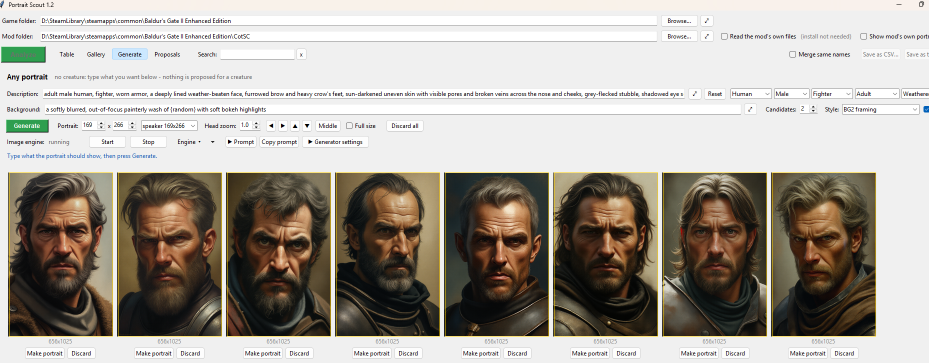
New Generate tab: a portrait for the selected creature, or any portrait at all from Race / Gender / Class pickers.
Drives a Stable Diffusion WebUI Forge server, or anything with an Automatic1111-style API, that you set up yourself: Start, Stop, Keep open, a progress bar, and a link to its own page. Setup steps and download links are shown in the tab when no engine is there.
Prompt, styles, background, LoRA on/off, model, picture size, steps, sampler and the generator's address are all editable in the window and kept in generator/settings.json.
Candidates can be opened full size, saved, discarded, or cropped to a game portrait (169x266, 210x330 or any size) with a crop preview and an adjustable head zoom.
Proposals and making a mod
New Proposals tab: every creature you have chosen a picture for, with its creature files, picture, size and areas. Proposals are kept per analysis and survive restarts.
Create mod... writes a ready-to-install WeiDU mod: pictures named after their creature files, a .tp2 offering replace or only fill in missing for each set, readme.txt, portraits.txt, a Project Infinity .ini, and a copy of WeiDU from your game folder.
Interface
Four tabs: Table, Gallery, Generate, Proposals.
Dialogs of the same NPC are grouped automatically; Merge same names is only for forcing it by name alone.
Click a creature or CRE name anywhere to copy it for NearInfinity.
Collapsible "Where this comes from", an always-visible creature count, and tooltips in place of long labels.
Portrait Generator function works quite nicely as well. Green bordered ones are generated / replaced and ready to be packed.