
[MOD] [UI] Book Of Torment: skins.
 bzm
Member Posts: 56
bzm
Member Posts: 56
Primarily, this modification was created as a test and in response to the question/need: a side dialogue box.
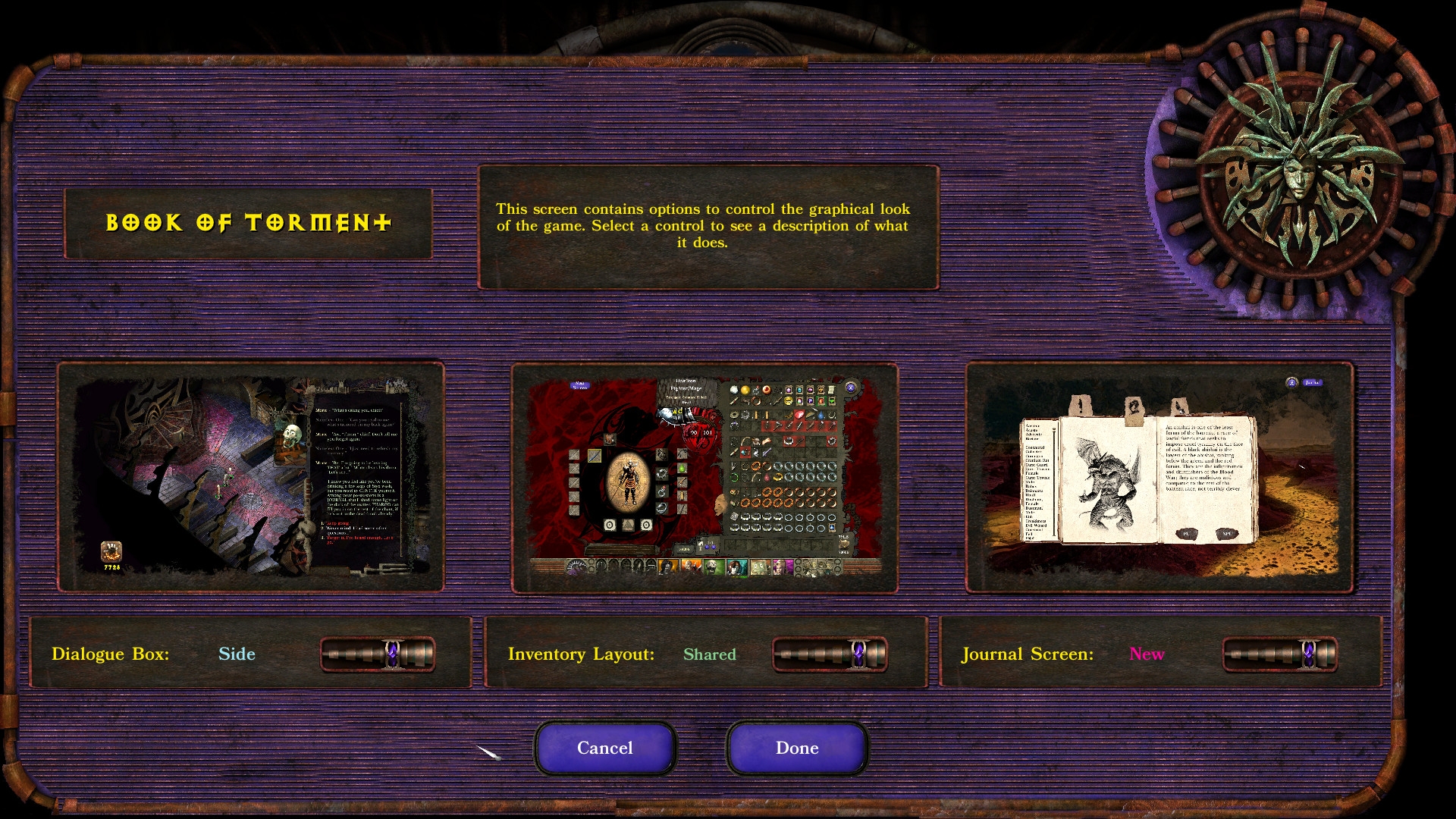
New version adds slider that allows to change dialogue box skins/inventory screens.
Keep in mind that this is still work in progress.
Screenshots: https://imgur.com/a/l4RrLcZ
Install notes:
Since v1.50 Weidu is required to install. More in readme.
How to set skins after install: Go to the graphics options in the game.
szef
New version adds slider that allows to change dialogue box skins/inventory screens.
Keep in mind that this is still work in progress.
Screenshots: https://imgur.com/a/l4RrLcZ
Install notes:
Since v1.50 Weidu is required to install. More in readme.
How to set skins after install: Go to the graphics options in the game.
szef
Post edited by bzm on
0
Comments
Folder is from 2023, and the file is latest (v1.45), but nexus is also fine
(I'll add link in first post).
v1.50 landed on github
Since this option increases the weight of the Baldur.lua configuration file with strings, it is uncertain whether and how it will affect the game; so it is experimental and optional.
As for slim down conf file: the simplest way is to delete Baldur.lua file, game creates it again, but keep in mind that all set options will back to default.
If you want slim down conf file by yourself: open Baldur.Lua (in my documents), then delete every entry starting with:
SetPrivateProfileString('Graphics','Dlg Responses Color','1')
SetPrivateProfileString('Dlg Color String','
Regarding the issue reported by user lightingflame on Nexus Mods about problems occurring after using the Chinese language patch from The Ring of Wonder: this was caused by a fix I added in the Chinese patch for a display bug that caused incorrect line breaks in Chinese. However, this fix interfered with proper modification of ui.menu during mod installation, leading to installation errors. I have therefore removed this fix from the Chinese patch. The issue should no longer occur now.
New reorganization of files, added compatibility with beta 3.2.x for lua files. Added italian translation (thx Sauler89).
Starting with version 2.0, I received permission to use Smeagolheart’s portrait patch code (thanks a lot), so BoT is now self-contained!
https://drive.google.com/file/d/1QvEqEbXd7v8XtEcWKBqGOLGWcyDqcx6b/view?usp=sharing
If no, try to delete coresponding names .MOS files in override. E.g. g-btfrm.MOS and leave only PNG.
I got access to iOS version of current ui.menu, and did my review. Results in following message, but while doing that, I noticed one bug in current BoT, that I'd like to report.
Currently when BoT version of Journal is open, ESC cannot be used to close that view. This should be fixed by adding one command to three sections of
g-bt_ui.tpa
this section, found in three locations in code
{
		area 974 12 50 50
		bam "XBUTT"
		action
		"
			e:GetActiveEngine():OnLeftPanelButtonClick(2)
		"
	}
'on escape' should be added here for each
{ area 974 12 50 50 bam "XBUTT" on escape action " e:GetActiveEngine():OnLeftPanelButtonClick(2) " }Version 02 of my BoT iOS patch released, notes
-code cleaned
-added 2nd component that modifies BoT Journal 'neon green' highlight color with more modest 'purple' color
**
Then for patching BoT to fit iPad resolutions better.
Current 3.2.2 version of the game enabled using non-standard iPad resolutions. This made fixing BoT to fit these smaller screens easier.
Vanilla JournalPortraitsConversations and BoT Side Conversation -views now work without patching needed.
Inventory screens also work without patching needed.
My patch should be installed after installing BoT, and it updates ui.menu by doing three main things:
1. Left dialogue bar visibility bug fix
BoT ui.menu includes one change compared to vanilla ui.menu that breaks left side bar dialogue selections from showing properly on iOS
dialogViewMode = nil
--in BoT this line is replaced with
dialogViewMode = 0
--which breaks this view on iOS, this is reverted in my patch
2. BoT Settings page -patch to better fit smaller screens
3. BoT version of Journal -page patch to better fit smaller screens
I'm using this patch on iPad mini (A17 Pro) which has 2266x1488 non-standard wide screen resolution. This patch is actually done for slightly smaller screen, but works well for A17. Not sure if this can be used for all small screen combinations, but this should work for most of the iPad/iPad mini sized devices.
Attached is small Weidu 249 mod that includes my BoT iOS ui.menu fixes. It can be used freely.
Regarding installing BoT for iOS device, as always when installing mods to iOS devices with modded .pvrz files included, this A7 mod (Option 7) should be installed before transferring files to iOS device.
https://github.com/Argent77/A7-TextureConvert/releases
Alternative .png files are not needed in iOS, mod provided .mos files work without issues.
I'm considering whether to just make an English version of the UI for the options screen, without using .lua language files (the English text will be hard-coded, and resistant when change ingame lang, and without placeholders). These "Dialogue box:" etc. texts are simple enough in English that they don't need to be translated (i think) ;p. And there are 11 languages available in game, but mod translations are only available for 4, hm.
@Jukez, I assume the new version should work with your patch.
Yes, my patch for iOS works fine with 2.1 also. It would only start breaking, if you decided to resize or move elements around.